
Context & introduction
So, I was bored and I decided to take a look at my Android TV because it was really laggy and I wanted to clean it up in order to gain some RAM or some CPU. I’m not going to mention the brand, but all I can say is that there were many useless apps. But the problem was that I couldn’t uninstall them because I wasn’t root on it and no exploit existed at the time.
So I took some time to dig into it and try to find some quick-win to get root fast. Spoiler: it didn’t work. But it did push me toward something much more interesting: vendor services and their Binder interfaces.
Through this article I will try to explain what are Android Binders and how to deal with them from a pentester/reverser perspective.
Initial recognition
The first thing I always do while pentesting Android IoT is to look at vendor binaries that run as root. This is usually the best starting point because vendor developers make much more mistakes than Android Developers and because it gives me a shortlist of high-privilege attack surface.
| |
⚠️ I had to change the name of the vendor and the name of the application.
As we can see there is plenty of non-android-developed binary that run as root on the device. I won’t go into detail here about all the steps I took before finding something interesting but in this article I will talk especially about customtvservice.
First, let’s locate the binary :
| |
Also, I will not mention here how I managed to get the firmware.

| |
As I mentioned earlier, I wanted easy quick wins like a little rat.

So I opened Ghidra and immediately started to search for some juicy imports. There were plenty but I decided to focus on system.
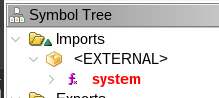
system is used at many places in the binary but something caught my attention.
| |
Don’t leave so fast I will explain what you are seeing. So what is this onTransact and these Parcel ? It is time to introduce Android Binders !
What are Android Binders ?
Before discussing binders, we need to talk about system services (which are different from the services exposed by Android applications). System services are invisible services for the user that are used by the Android OS, hardware drivers, and privileged daemons so that everything works together.
On Android, processes (like application) run in isolated sandboxes. Two applications cannot directly read each other’s memory. So how does, say, a music app request audio focus from the system? Through IPC (Inter-Process Communication). Android uses a kernel mechanism called the Binder to make this efficient.
The kernel driver
The binder is a character device: /dev/binder. Every Android process that wants to use the IPC framework opens and mmap()s this file. The kernel driver acts as a middleman: when process A sends a transaction to process B, the kernel copies the data from A’s address space into B’s mmap’d region directly, without going through userspace.
There are four standard binder devices on Android:
| Device | Usage |
|---|---|
/dev/binder | Standard Android framework IPC |
/dev/hwbinder | Hardware HAL communication |
/dev/vndbinder | Vendor services (AOSP-standard) |
And in our case :
| |
Wait, there is a fourth one: /dev/sbinder. That is not standard. We will come back to that.

ServiceManager
Since multiple services can exist, there needs to be a directory. The ServiceManager is a well-known process that acts as the DNS of the binder world. It listens at handle 0 (the reserved context manager handle). Other services register themselves by name, and clients look them up by name to get a handle.
| |
The object model
The binder framework uses three key abstractions:
IBinder: The interface. Every binder object implements it.BBinder: The server-side implementation. You subclass this and overrideonTransact().BpBinder(Binder Proxy): The client-side stub. It holds a handle integer and forwards calls over the kernel driver.
When you call a method on a remote service, you are calling transact() on a BpBinder. The kernel delivers a BR_TRANSACTION to the server, which calls onTransact() on its BBinder implementation.
Parcels: the serialization format
Data is passed through Parcel objects. A Parcel is essentially a flat byte buffer with some extra information for embedded binder objects. It supports typed reads and writes: readInt32(), readString16(), readBlob(), etc.
The first field of every Parcel is the interface token, a UTF-16 string that identifies which interface the call is for. The server verifies this with enforceInterface() to prevent confused-deputy attacks.
So now, going back to the Ghidra output from earlier, the onTransact() function is the server-side handler. param_1 is the transaction code (what operation is being requested), param_2 is the input Parcel (data from the caller), and param_3 is the output Parcel (where the response goes).
| |
/dev/sbinder: ntv’s custom binder
Going back to Ghidra, the system() call I found earlier is not exposed on the standard /dev/binder. It lives in sbinder_system_service, registered on a completely different device: /dev/sbinder.
The proof is in the binary’s binder_open() function:
| |
And this is used to start a ServiceManager loop:
| |
customtvservice embeds its own Service Manager. It opens /dev/sbinder, registers itself as the context manager (handle 0), and starts a loop exactly like the standard servicemanager process does for /dev/binder. This is a fully parallel IPC universe, invisible to the standard service list command.
What services are registered?
The function proxy_add_service() in customtvservice decides which services to register at startup, based on a bitmask argument:
| |
Among others, remote_property_module is registered (bit 5 is set in 0x126). And sbinder_system_service, the one with system(), is registered separately.
On top of customtvservice, the application_manager binary exposes remote_application_manager_sbinder. And ntvi_server exposes over 40 different sbinder clients covering audio, video, CEC, Bluetooth, network settings, EPG, PVR…
SELinux and sbinder access
The /dev/sbinder device has world-readable/writable permissions (crw-rw-rw-), but it carries a SELinux label:
| |
The SELinux policy defines which domains can access it. Looking at the policy rules in the firmware:
| |
Interestingly, both untrusted_app (any third-party app) and shell (ADB) are allowed to open, read, write, and even map the device. On paper, this means we can talk to sbinder from ADB.
The security layer: tos_system_verify
If unprivileged processes can open /dev/sbinder, what actually protects the sensitive transactions? The answer is an application-level security mechanism baked into customtvservice: tos_system_verify.
Every onTransact() handler in customtvservice starts with a block like this:
| |
The function tos_system_verify maintains a whitelist of authorized PIDs. When a process sends a transaction, the server retrieves the caller’s PID from the kernel (via IPCThreadState::getCallingPid() : this cannot be spoofed) and checks it against the list. If the PID is not on the list, the call is rejected.
Any process whose PID is not in the whitelist will get its call rejected.
How does a process get authorized?
There is a bootstrap service: remote_property_module, registered on sbinder. It exposes a transaction (code 6) called TRANSACTION_tos_system_authorized that adds a PID to the whitelist. The authorization requires a signed key:
| |
The authorized_key string has this format:
| |
The function fpi_system_security_authorized verifies it with the following steps:
- Base64-decode the signature
- RSA-decrypt it with the embedded public key
- Verify the SHA1 hash matches
SHA1(cmdline) - Verify
/proc/<pid>/cmdlinematches the declared cmdline - If all checks pass, add the PID to the “licensed app list”
This means that to authorize any process, you need a valid RSA signature from ntv’s private key.
The bypass: transaction codes 1-7 skip verification
But wait. There is something peculiar at the top of the remote_property_module’s onTransact():
| |
The mask 0xfffffffb is ~0x4 so it clears bit 2. Let’s trace through what this condition evaluates to for each transaction code:
| Code | & 0xfffffffb | - 2 | > 1 | Verification? |
|---|---|---|---|---|
| 1 | 1 | -1 | No | Bypassed |
| 2 | 2 | 0 | No | Bypassed |
| 3 | 3 | 1 | No | Bypassed |
| 4 | 0 | -2 | No | Bypassed |
| 5 | 1 | -1 | No | Bypassed |
| 6 | 2 | 0 | No | Bypassed |
| 7 | 3 | 1 | No | Bypassed |
| 8 | 8 | 6 | Yes | Verified |
| 9+ | … | >1 | Yes | Verified |
Transaction codes 1 through 7 all bypass tos_system_verify. Crucially, transaction code 6, the one that adds a PID to the authorization whitelist, is in that unprotected range. The intent is obviously to allow any process to call it in order to authenticate itself. The security comes from the RSA signature requirement, not from access control.
The PID spoofing vulnerability
And here is where it gets interesting. Inside the handler for transaction code 6:
| |
The PID being authorized is not obtained from IPCThreadState::getCallingPid() : it is read directly from the Parcel data sent by the client. The caller fully controls which PID gets whitelisted.
This means:
- We can open
/dev/sbinderfrom ADB - Send transaction code
6toremote_property_module - Put any PID we want in the Parcel like the PID of
customtvserviceitself - If the signature check passes, that PID gets whitelisted for arbitrary operations
The attack is conceptually simple. The problem is step 4.
The RSA wall
Let’s look at what fpi_system_security_authorized actually verifies. Embedded inside customtvservice is a 1024-bit RSA public key:
| |
Any process that wants to use the sbinder services must present a valid token of the form <cmdline>|ntv#<base64_signature>, where the signature is an RSA-SHA1 signature of the process cmdline, signed with ntv’s private key.
The error strings in the binary make the verification steps explicit:
| |
I searched the entire firmware for keys matching this public key’s modulus, and for any pre-signed authorization tokens. Nothing. The private key lives on ntv’s build servers. No application in the firmware carries a hardcoded signed token either.

This effectively blocks any direct exploitation of sbinder_system_service. Even with the PID spoofing bug and the bypass on transaction code 6, we cannot generate a valid RSA signature without the private key.
application_manager: a different beast
While customtvservice is well-protected by tos_system_verify, I noticed that application_manager (another root binary) tells a very different story.
| |
Looking at application_manager’s onTransact() in Ghidra, there is no call to tos_system_verify. At all. The service processes transactions from any caller without checking whether they are authorized.
The service descriptor is remote_application_manager_sbinder. It exposes operations mapped from libtaf_client.so (ntv’s Application Framework client library):
| Code | Function | Notes |
|---|---|---|
| 22 | PushKeyevent | Key injection |
| 34 | InstallApp | Install a .tpk application |
| 35 | UninstallApp | Uninstall an application |
| 38 | GetInstalledApps | List installed apps |
Transaction 34 - InstallApp is particularly interesting. Looking at AppRunner::StartApp in Ghidra:
| |
The binary at the provided path is executed via fork + execve. Since application_manager runs as root, the spawned process also runs as root. Install an application, get a root process. No RSA signatures required.

The Parcel format for InstallApp (transaction code 34) is:
| |
I (ChatGPT) wrote a native exploit that implements the raw sbinder protocol to send this transaction:
| |
And the result:
| |
The file opened fine. But mmap() failed. SELinux struck again.
SELinux: the real gatekeeper
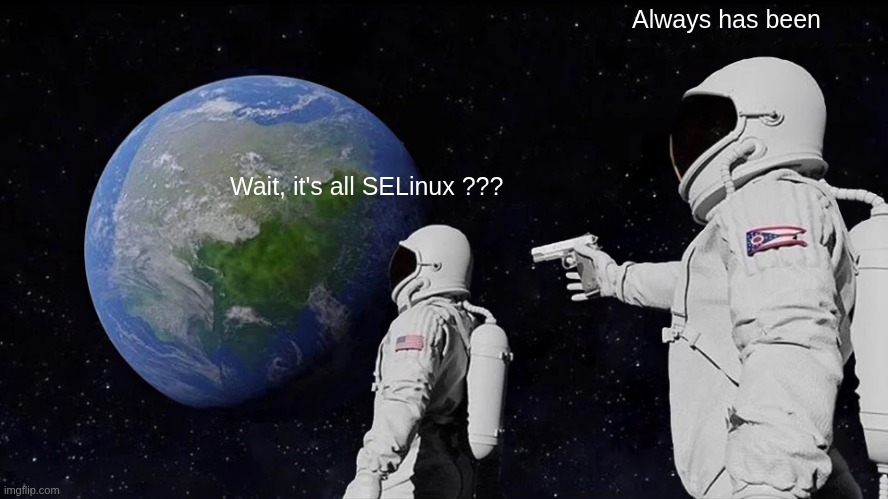
Despite the SELinux policy allowing shell_30_0 to perform read write open map on sbinder_device, the kernel’s AVC log tells a different story:
| |
The denial happens because the ADB shell context is u:r:shell:s0, not u:r:shell_30_0:s0. The policies for shell_30_0 and shell are separate SELinux domains, and shell (the context used for processes launched via ADB) is not granted map on sbinder_device.
Without mmap, the binder protocol cannot function, the kernel driver requires a memory-mapped region to deliver reply data back to userspace. The exploit is blocked before it can even look up the service.
The situation across all binder devices:
| Device | ADB shell access | Reason |
|---|---|---|
/dev/binder | Full | Standard Android, shell context allowed |
/dev/hwbinder | Full | Hardware HAL, shell context allowed |
/dev/vndbinder | Full | Vendor, shell context allowed |
/dev/sbinder | No mmap | SELinux blocks shell:s0 from mapping |
What would have worked
Let me draw the complete picture of the security layers encountered:
| |
The real vulnerabilities identified are:
- PID spoofing in transaction code 6 of
remote_property_module: the PID to whitelist is read from client-controlled data - application_manager has no
tos_system_verify: any process that can speak sbinder can install apps that execute as root sbinder_system_serviceexposessystem()behind what should be an authorization layer
But the defense-in-depth approach : SELinux blocking the mmap, and RSA signatures for the authorization path, prevented full exploitation from the ADB shell context.
To go further, one would need either:
- A way to run code in a process context that SELinux allows to mmap
/dev/sbinder(e.g., exploit an already-authorized process likecom.ntv.systemserver) - The RSA private key, or a way to extract an existing signed key from memory of a running authorized process
- A race condition on
/proc/<pid>/cmdlineduring the PID spoofing window
Conclusion
Android binders are a fascinating IPC mechanism and a rich attack surface on vendor-customized devices. ntv went further than most by implementing a completely parallel binder universe on /dev/sbinder with their own service manager, their own authorization mechanism, and their own signed-key whitelist.
A PID that is controlled by an attacker should never be trusted for security decisions, and a service with no access control (application_manager) that executes binaries as root is one SELinux bypass away from full compromise.
References
- https://source.android.com/docs/core/architecture/hidl/binder-ipc
- https://www.synacktiv.com/en/publications/binder-transactions-in-the-bowels-of-the-linux-kernel
- https://cs.android.com/android/platform/superproject/+/main:frameworks/native/libs/binder/
- https://duo.com/blog/android-binder-ipc-on-android
- https://developer.android.com/reference/android/os/Binder
- https://blog.thalium.re/posts/fuzzing-samsung-system-services/