Why am I doing this to myself?
Soooo, if this isn’t your first time visiting this blog, you should know that I’ve been organizing HeroCTF for seven years. In previous years, we had never had any hardware challenges so I decided to create one for the 7th edition.
During my work at OWN.Security, I had the oppurtunity to work with bootloaders in a security context so I thought it was a good idea to use what I learned to create a good and realistic challenge.
Through this article I will explain how I build the challenge and how to exploit it.
Limitations
HeroCTF was and has always be an online competition so it was really difficult to provide a device to the +4200 players. I made some researches and found that I was not the first trying to make such challenge : FCSC dit it before me so I took inspiration from them.
As shown in this challenge, the player only needs to run docker compose and then listen on the exposed port with netcat.
That’s where QEMU comes in. I’m going to emulate a bootloader on some random port.
What will be the challenge

For the goal, I wanted something not too hard that combines reverse-engineering and U-Boot. So, for the challenge, the player will have to connect to a remote port then they will see the message Press ENTER to start boot.
Then, the U-Boot bootloader will boot, and a message will appear at the end of the boot process: Boot completed, here is your flag: {encrypted flag}. To retrieve the flag, the player must be able to decrypt the encrypted part.
To do this, they must successfully stop the boot with a custom passphrase, then access the U-Boot console and dump the firmware for reverse engineering to see how the {encrypted part} is encrypted.
A bootloader dump will be provided with the challenge to enable the passphrase to be retrieved, but the firmware will not be provided with the bootloader.
Diving into technique
Building U-Boot for QEMU
According to the U-Boot documentation, it is fortunately possible to build U-Boot for QEMU ARM.
 1
 2
 3
 4
 5
 6
 7
 8
 9
10
11
| # don't make me explain this line
$ git clone https://source.denx.de/u-boot/u-boot.git
# use ARM toolchain because native gcc does not support ARM
$ export CROSS_COMPILE=arm-linux-gnueabihf-
# generate a .config file for the qemu-system-arm virtual machine
$ make qemu_arm_defconfig
# compile U-Boot for QEMU ARM using all available cores
$ make -j16
|
Then, a u-boot.bin must be obtained.
1
2
3
4
5
| $ ls -la
[...]
-rwxrwxr-x 1 thib thib 10200424 mai 21 2025 u-boot
-rw-rw-r-- 1 thib thib 1426784 mai 21 2025 u-boot.bin
[...]
|
Before going any further, we can check whether our bootloader is working properly:
 1
 2
 3
 4
 5
 6
 7
 8
 9
10
11
12
13
14
| $ qemu-system-arm -machine virt -nographic -bios u-boot.bin
Bloblist at 0 not found (err=-2)
alloc space exhausted ptr 400 limit 0
Bloblist at 0 not found (err=-2)
U-Boot 2026.01-rc4 (Dec 09 2025 - 16:23:21 +0100)
DRAM: 128 MiB
using memory 0x46690000-0x476d0000 for malloc()
Core: 51 devices, 14 uclasses, devicetree: board
Flash: 64 MiB
Loading Environment from Flash... *** Warning - bad CRC, using default environment
|
It works perfectly.

But currently it’s just a naked bootloader that doesn’t boot anything at all…
Let’s start by adding a custom passphrase and a reasonable delay. This can be done natively with u-boot using environment variables according to this documentation.
1
2
3
4
5
| $ nano configs/qemu_arm_defconfig
CONFIG_BOOTDELAY=5
CONFIG_AUTOBOOT_KEYED=y
CONFIG_AUTOBOOT_STOP_STR="bFoL^GMSThEpSPVX2LU@Zx^58M$h!nMaoRBzu7Wa"
CONFIG_AUTOBOOT_PROMPT="Press passphrase to stop autoboot, or wait %d seconds to start boot\n"
|
Let’s build it again and test if it works.
 1
 2
 3
 4
 5
 6
 7
 8
 9
10
11
12
13
| $ qemu-system-arm -machine virt -nographic -bios u-boot.bin
Bloblist at 0 not found (err=-2)
alloc space exhausted ptr 400 limit 0
Bloblist at 0 not found (err=-2)
U-Boot 2026.01-rc4-dirty (Dec 09 2025 - 16:40:35 +0100)
[...]
Press passphrase to stop autoboot, or wait 5 seconds to start boot
bFoL^GMSThEpSPVX2LU@Zx^58M$h!nMaoRBzu7Wa # inputed by me
=>
|
Yayyy this is working too. But again, that doesn’t boot anything at all. Let’s build the firmware.
Building the firmware
U-Boot is just a bootloader that does not do anything in the end. We must provide it a firmware that it will launch at the end of the boot process.
The goal of the firmware will be to display the encrypted flag on the user’s console. However, the flag must not be in plaintext in the firmware, so we will use AES for the lore, but in reality, it will just be XORed.
The first issue we will encounter is that it is not possible to do a classic printf() because there is no OS, no syscalls, no libc, no stdout… We are alone in this bare-metal firmware.

Buuuuut… UART can be the solution!
UART
I won’t go into detail about what UART is here, but it’s the only hardware output available.
I’m not going to lie, I was a little lost at that point, so AI helped me with what to do next.
In bare metal programming (without an operating system), communication with the hardware is achieved by writing to and reading from specific memory addresses.
On the QEMU virtual machine, the serial console is a PL011 mapped to 0x09000000. When the CPU writes to this address, it isn’t writing to memory, it is sending a signal to the UART hardware controller.
There are two registers :
- Data Register (DR): Writing to this address sends the character to the transmit queue.
- Flag Register (FR): Contains status bits. The 5th bit tells if the buffer is full and that we have to wait
We take advantage of the fact that U-Boot has already initialized it so our firmware only has to write to the registers.
 1
 2
 3
 4
 5
 6
 7
 8
 9
10
11
12
| // uart.h
#ifndef UART_H
#define UART_H
#include <stdint.h>
#define UART0_BASE 0x09000000UL // Memory address of the hardware
void uart_putc(char c);
void uart_puts(const char *s);
#endif
|
 1
 2
 3
 4
 5
 6
 7
 8
 9
10
11
12
13
14
15
16
17
18
19
20
21
22
23
24
| // uart.c
#include "uart.h"
// Registres PL011
#define UART_DR (*(volatile uint32_t *)(UART0_BASE + 0x00)) // Data Register (DR)
#define UART_FR (*(volatile uint32_t *)(UART0_BASE + 0x18)) // Flag Register
#define UART_FR_TXFF (1 << 5) // Is the buffer full ?
void uart_putc(char c) // Send a char to UART but check if the buffer is full
{
while (UART_FR & UART_FR_TXFF)
;
UART_DR = (uint32_t)c;
}
void uart_puts(const char *s) // Send a string
{
while (*s) {
if (*s == '\n')
uart_putc('\r');
uart_putc(*s++);
}
}
|
Encryption part
We now know how to write to the UART console. The next step is to encrypt the flag with AES and display it on the UART output. I will use Tiny Aes.
 1
 2
 3
 4
 5
 6
 7
 8
 9
10
11
12
13
14
15
16
17
18
19
20
21
22
23
24
25
26
27
28
29
30
31
32
33
34
35
36
37
38
39
40
41
42
43
44
45
46
47
48
| static const uint8_t flag_obf[39] = {
0x6b, 0x46, 0x51, 0x4c, 0x58,
0x70, 0x76, 0x60, 0x60, 0x10,
0x70, 0x70, 0x65, 0x76, 0x6f,
0x6f, 0x7a, 0x7c, 0x10, 0x7b,
0x73, 0x6f, 0x13, 0x12, 0x14,
0x10, 0x67, 0x7c, 0x61, 0x13,
0x13, 0x77, 0x6f, 0x13, 0x17,
0x67, 0x10, 0x71, 0x5e
}; // Flag encrypted
static void decode_flag(uint8_t *dst)
{
for (size_t i = 0; i < FLAG_LEN; i++) {
dst[i] = flag_obf[i] ^ 0x23;
}
} // Just a xor with 0x23
int main(void)
{
struct AES_ctx ctx;
AES_init_ctx(&ctx, aes_key);
uint8_t buffer[48] = {0};
decode_flag(buffer);
for (size_t i = 0; i < sizeof(buffer); i += 16) {
AES_ECB_encrypt(&ctx, buffer + i);
} // AES is only used to print the flag to the user and prevent XOR bruteforcing
uart_puts("Boot completed, here is your flag : ");
char out[2];
for (size_t i = 0; i < sizeof(buffer); i++) {
hex_byte(buffer[i], out);
uart_putc(out[0]);
uart_putc(out[1]);
}
uart_puts("\n");
while (1) {
// idle
}
return 0;
}
|
The firmware is cooked!

But bad news… There is still no OS to launch the main() function of our firmware.
Run the firmware
We need something that tells the processor where to initialize the stack and where to go next to find the main :
 1
 2
 3
 4
 5
 6
 7
 8
 9
10
| // start.S
.section .text.start
.global _start
_start:
ldr sp, =0x48000000 // init the stack, far away from the start of the RAM (0x40000000)
bl main // jump to the main() of the firmware
1: b 1b
|
The Linker Script (.ld) specifies the exact memory organization :
 1
 2
 3
 4
 5
 6
 7
 8
 9
10
11
12
13
14
15
16
17
18
19
20
21
22
23
24
25
26
| /* linked.ld */
ENTRY(_start)
SECTIONS
{
. = 0x40200000; //
.text : {
*(.text.start) // start.S shown above
*(.text*) // executable code
}
.rodata : {
*(.rodata*) // read-only data
}
.data : {
*(.data*) // global variables
}
.bss : {
*(.bss*)
*(COMMON)
}
}
|
With this file, we make sure that QEMU initializes the stack first before launching the firmware.
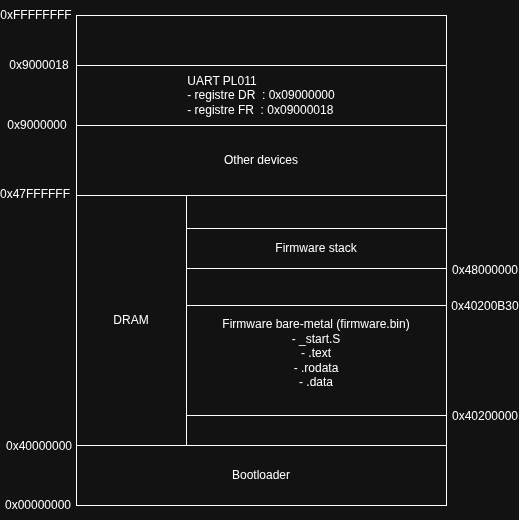
Compile the firmware
We can now build the firmware :
 1
 2
 3
 4
 5
 6
 7
 8
 9
10
11
12
13
14
15
16
17
18
19
20
21
| # start.S
$ arm-none-eabi-gcc -Wall -O2 -ffreestanding -nostdlib -nostartfiles -c start.S -o start.o
# main C
$ arm-none-eabi-gcc -Wall -O2 -ffreestanding -nostdlib -nostartfiles -c main.c -o main.o
# uart implem
$ arm-none-eabi-gcc -Wall -O2 -ffreestanding -nostdlib -nostartfiles -c uart.c -o uart.o
# tiny aes
$ arm-none-eabi-gcc -Wall -O2 -ffreestanding -nostdlib -nostartfiles -c aes.c -o aes.o
# linker
$ arm-none-eabi-gcc -Wall -O2 -ffreestanding -nostdlib -nostartfiles -T linker.ld -o firmware.elf start.o main.o uart.o aes.o mini_libc.o
# Remove useless section to to ensure that _start is at the very top
$ arm-none-eabi-objcopy -O binary \
-R .note -R .note.* \
-R .comment -R .comment.* \
-R .ARM.attributes -R .ARM.attributes.* \
firmware.elf firmware.bin
|

1
2
3
4
5
6
| $ ls -la
total 100
[...]
-rwxrwxr-x 1 thib thib 3448 déc. 9 17:59 firmware.bin
-rwxrwxr-x 1 thib thib 9072 déc. 9 17:59 firmware.elf
[...]
|
We indicated in the linker that the firmware would be at address 0x40200000. Let’s make sure that’s the case with QEMU and U-Boot :
1
2
3
4
| $ cat u-boot/qemu_arm_defconfig
[...]
CONFIG_BOOTCOMMAND="go 0x40200000"
[...]
|
 1
 2
 3
 4
 5
 6
 7
 8
 9
10
11
12
13
14
15
16
17
18
19
20
21
22
23
24
25
26
| $ qemu-system-arm -machine virt -nographic \
-bios u-boot.bin \
-device loader,file=firmware.bin,addr=0x40200000
Bloblist at 0 not found (err=-2)
alloc space exhausted ptr 400 limit 0
Bloblist at 0 not found (err=-2)
U-Boot 2026.01-rc2-00041-g69cc92d6869b-dirty (Nov 16 2025 - 21:41:23 +0100)
DRAM: 128 MiB
using memory 0x4668d000-0x476cd000 for malloc()
Core: 51 devices, 14 uclasses, devicetree: board
Flash: 64 MiB
Loading Environment from Flash... *** Warning - bad CRC, using default environment
In: serial,usbkbd
Out: serial,vidconsole
Err: serial,vidconsole
No USB controllers found
Net: eth0: virtio-net#32
Press passphrase to stop autoboot, or wait 5 seconds to start boot
## Starting application at 0x40200000 ...
Boot completed, here is your flag : CE04188B3AA1F39921E5ABBCB0BD7531BB723B6ECA66C3FEDCA81C587E8588350C1035DA0D1C58E6868FE8E46CFC7551
|

I then created a Dockerfile and a docker-compose to make the challenge available to players, but that’s not very interesting here. I also added some environment variables to specify the firmware size.
Solve
Category
Misc
Difficulty
Medium
Author
Thib
Description
It’s just a bootloader. Try to find the flag!
Architecture : ARMv7 32bits little-endian
Encryption used : AES-128 ECB
Deploy an instance at https://deploy.heroctf.fr/.
Files
Write up
The first step is to launch the challenge and listen on the specified port:
1
2
| $ nc localhost 4000
Press ENTER to start boot
|
It looks like we can start a boot procedure, which makes sense given the name of the challenge. So let’s press ENTER.
 1
 2
 3
 4
 5
 6
 7
 8
 9
10
11
12
13
14
15
16
17
18
19
20
| Bloblist at 0 not found (err=-2)
alloc space exhausted ptr 400 limit 0
Bloblist at 0 not found (err=-2)
U-Boot 2026.01-rc2-00041-g69cc92d6869b-dirty (Nov 15 2025 - 17:13:43 +0100)
DRAM: 128 MiB
using memory 0x4668d000-0x476cd000 for malloc()
Core: 51 devices, 14 uclasses, devicetree: board
Flash: 64 MiB
Loading Environment from Flash... *** Warning - bad CRC, using default environment
In: serial,usbkbd
Out: serial,vidconsole
Err: serial,vidconsole
No USB controllers found
Net: eth0: virtio-net#32
Press passphrase to stop autoboot, or wait 5 seconds to start boot
|
At the end of the boot, we can see an encrypted flag :
1
2
| ## Starting application at 0x40200000 ...
Boot completed, here is your encrypted flag : CE04188B3AA1F39921E5ABBCB0BD7531BB723B6ECA66C3FEDCA81C587E8588350C1035DA0D1C58E6868FE8E46CFC7551
|
It is a bootloader based on U-Boot and seems to require a passphrase to stop booting and access the UBoot console.
But how can we find this passphrase? Luckily, the bootloader binary is provided with the challenge, so we can try to reverse engineer it.
There are two ways to do this:
 1
 2
 3
 4
 5
 6
 7
 8
 9
10
11
12
| $ strings u-boot.bin | grep -A 5 -B 5 "passphrase"
kernel-offset
kernaddr
rootdisk-offset
rootaddr
bFoL^GMSThEpSPVX2LU@Zx^58M$h!nMaoRBzu7Wa
Press passphrase to stop autoboot, or wait %d seconds to start boot
bootdelaykey
bootstopkey
fdtdec_setup
%s(): initcall %s() failed
initf_malloc
|
- Clean way (As indicated in the instructions, it is ARMv7 32-bit little-endian.) :
We search the string :
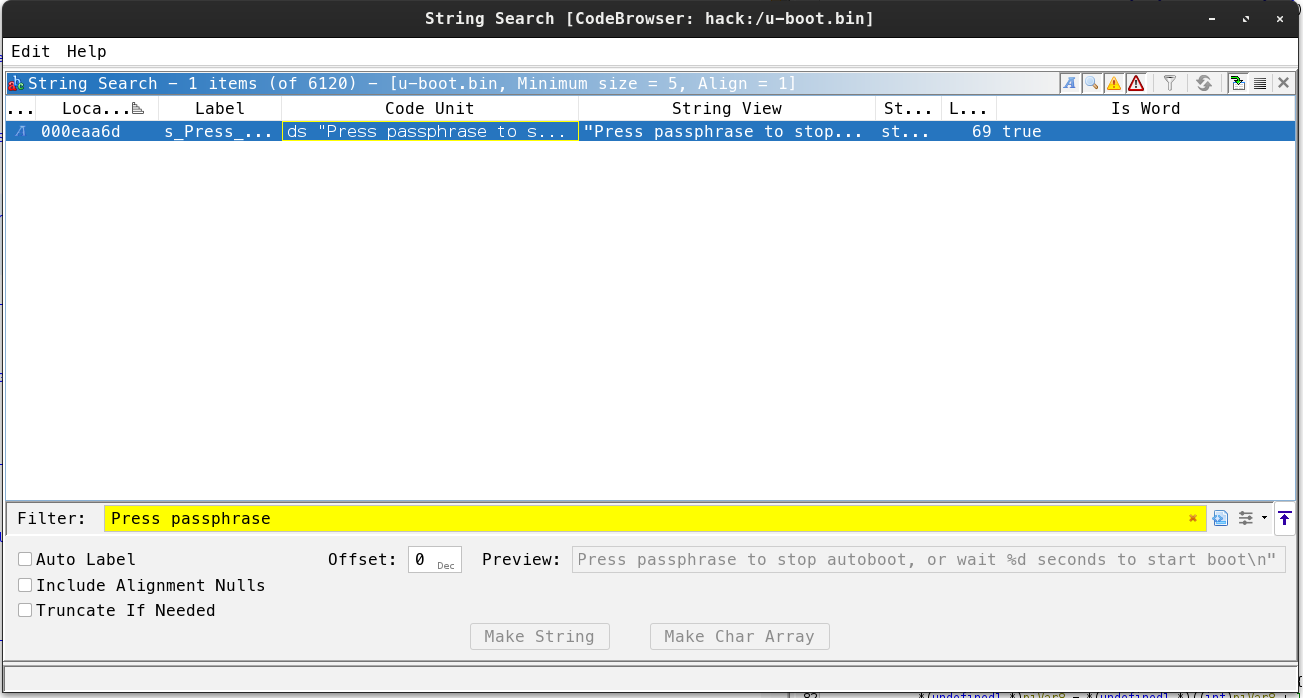
- We look at the strange character strings around the occurrence.
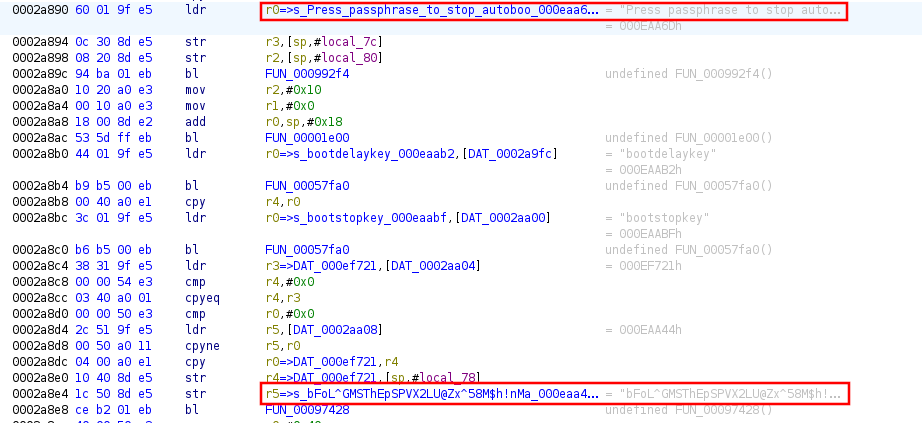
So we can see that the passphrase is “bFoL^GMSThEpSPVX2LU@Zx^58M$h!nMaoRBzu7Wa”
You can therefore stop the boot process and access the UBoot console.
  1
  2
  3
  4
  5
  6
  7
  8
  9
 10
 11
 12
 13
 14
 15
 16
 17
 18
 19
 20
 21
 22
 23
 24
 25
 26
 27
 28
 29
 30
 31
 32
 33
 34
 35
 36
 37
 38
 39
 40
 41
 42
 43
 44
 45
 46
 47
 48
 49
 50
 51
 52
 53
 54
 55
 56
 57
 58
 59
 60
 61
 62
 63
 64
 65
 66
 67
 68
 69
 70
 71
 72
 73
 74
 75
 76
 77
 78
 79
 80
 81
 82
 83
 84
 85
 86
 87
 88
 89
 90
 91
 92
 93
 94
 95
 96
 97
 98
 99
100
101
102
103
104
105
106
107
108
109
110
111
112
113
114
115
116
117
118
119
| Press passphrase to stop autoboot, or wait 5 seconds to start boot
bFoL^GMSThEpSPVX2LU@Zx^58M$h!nMaoRBzu7Wa
=> help
help
? - alias for 'help'
base - print or set address offset
bdinfo - print Board Info structure
blkcache - block cache diagnostics and control
bloblist - Bloblists
boot - boot default, i.e., run 'bootcmd'
bootd - boot default, i.e., run 'bootcmd'
bootdev - Boot devices
bootefi - Boots an EFI payload from memory
bootelf - Boot from an ELF image in memory
bootflow - Boot flows
bootm - boot application image from memory
bootmeth - Boot methods
bootp - boot image via network using BOOTP/TFTP protocol
bootstd - Standard-boot operation
bootvx - Boot vxWorks from an ELF image
bootz - boot Linux zImage image from memory
chpart - change active partition of a MTD device
cls - clear screen
cmp - memory compare
coninfo - print console devices and information
cp - memory copy
crc32 - checksum calculation
cyclic - Cyclic
date - get/set/reset date & time
dfu - Device Firmware Upgrade
dhcp - boot image via network using DHCP/TFTP protocol
dm - Driver model low level access
echo - echo args to console
editenv - edit environment variable
eficonfig - provide menu-driven UEFI variable maintenance interface
env - environment handling commands
erase - erase FLASH memory
exit - exit script
ext2load - load binary file from a Ext2 filesystem
ext2ls - list files in a directory (default /)
ext4load - load binary file from a Ext4 filesystem
ext4ls - list files in a directory (default /)
ext4size - determine a file's size
false - do nothing, unsuccessfully
fatinfo - print information about filesystem
fatload - load binary file from a dos filesystem
fatls - list files in a directory (default /)
fatmkdir - create a directory
fatrm - delete a file
fatsize - determine a file's size
fatwrite - write file into a dos filesystem
fdt - flattened device tree utility commands
flinfo - print FLASH memory information
fstype - Look up a filesystem type
fstypes - List supported filesystem types
go - start application at address 'addr'
help - print command description/usage
iminfo - print header information for application image
imxtract - extract a part of a multi-image
itest - return true/false on integer compare
lcdputs - print string on video framebuffer
ln - Create a symbolic link
load - load binary file from a filesystem
loadb - load binary file over serial line (kermit mode)
loads - load S-Record file over serial line
loadx - load binary file over serial line (xmodem mode)
loady - load binary file over serial line (ymodem mode)
loop - infinite loop on address range
ls - list files in a directory (default /)
md - memory display
mii - MII utility commands
mkdir - create a directory
mm - memory modify (auto-incrementing address)
mtd - MTD utils
mtdparts - define flash/nand partitions
mv - rename/move a file/directory
mw - memory write (fill)
net - NET sub-system
nm - memory modify (constant address)
nvme - NVM Express sub-system
panic - Panic with optional message
part - disk partition related commands
pci - list and access PCI Configuration Space
ping - send ICMP ECHO_REQUEST to network host
poweroff - Perform POWEROFF of the device
printenv - print environment variables
protect - enable or disable FLASH write protection
pxe - get and boot from pxe files
qfw - QEMU firmware interface
random - fill memory with random pattern
reset - Perform RESET of the CPU
rm - delete a file
run - run commands in an environment variable
save - save file to a filesystem
saveenv - save environment variables to persistent storage
scsi - SCSI sub-system
scsiboot - boot from SCSI device
setcurs - set cursor position within screen
setenv - set environment variables
setexpr - set environment variable as the result of eval expression
showvar - print local hushshell variables
size - determine a file's size
sleep - delay execution for some time
source - run script from memory
spawn - run commands and summarize execution time
test - minimal test like /bin/sh
tftpboot - load file via network using TFTP protocol
tpm - Issue a TPMv1.x command
tpm2 - Issue a TPMv2.x command
true - do nothing, successfully
usb - USB sub-system
usbboot - boot from USB device
ut - unit tests
vbe - Verified Boot for Embedded
version - print monitor, compiler and linker version
virtio - virtio block devices sub-system
wait - wait for one or more jobs to complete
wget - boot image via network using HTTP protocol
=>
|
The goal here is to dump the firmware from memory to attempt to reverse engineer it locally and recover the flag.
How can we dump part of the memory? There are several ways to do this, but since we are on a remote interface via netcat, there are few ways to do it. Looking at the UBoot documentation, we come across the md command.
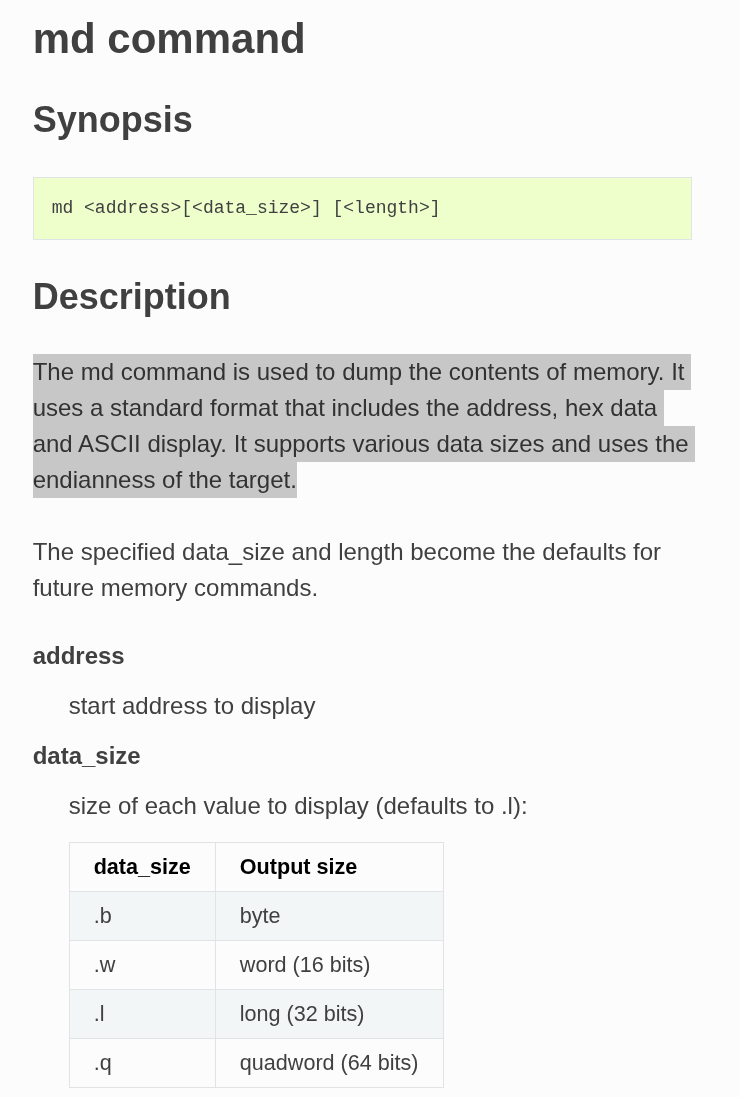
To find the start address of the firmware and its size, it’s quite simple: just do a printenv and look at the bootcmd variable, which corresponds to the command that will be executed at boot time.
 1
 2
 3
 4
 5
 6
 7
 8
 9
10
11
12
13
14
15
16
17
18
19
20
21
22
23
24
25
26
27
28
| => printenv
printenv
arch=arm
baudrate=115200
board=qemu-arm
board_name=qemu-arm
boot_targets=qfw usb scsi virtio nvme dhcp
bootcmd=go 0x40200000
bootdelay=5
cpu=armv7
ethaddr=52:54:00:12:34:56
fdt_addr=0x40000000
fdt_high=0xffffffff
fdtcontroladdr=4658ceb0
fwaddr=0x40200000
fwsize=0x00000B30
initrd_high=0xffffffff
kernel_addr_r=0x40400000
loadaddr=0x40200000
preboot=usb start
pxefile_addr_r=0x40300000
ramdisk_addr_r=0x44000000
scriptaddr=0x40200000
stderr=serial,vidconsole
stdin=serial,usbkbd
stdout=serial,vidconsole
usb_ignorelist=0x1050:*,
vendor=emulation
|
We can see that bootcmd=go 0x40200000 and fwsize=0x00000B30. Let’s try to dump this part of the memory!
 1
 2
 3
 4
 5
 6
 7
 8
 9
10
11
12
13
14
15
16
17
18
19
20
21
22
23
24
25
26
27
28
29
30
31
32
33
34
35
36
37
38
39
40
41
42
43
44
45
46
47
48
49
50
51
52
53
54
55
56
57
58
59
60
61
62
63
64
65
| => md.b $fwaddr $fwsize
md.b $fwaddr $fwsize
40200000: 12 d3 a0 e3 00 00 00 fa fe ff ff ea f0 b5 22 4d .............."M
40200010: bd b0 7d 44 0c ae 30 46 29 46 6f 46 00 f0 d4 fa ..}D..0F)FoF....
40200020: 0d f1 ff 34 30 22 00 21 38 46 00 f0 b5 fb 05 f1 ...40".!8F......
40200030: 0f 02 05 f1 36 00 21 46 12 f8 01 3f 83 f0 23 03 ....6.!F...?..#.
40200040: 90 42 01 f8 01 3f f7 d1 39 46 30 46 00 f0 de fa .B...?..9F0F....
40200050: 12 4d 04 a9 30 46 00 f0 d9 fa 08 a9 30 46 7d 44 .M..0F......0F}D
40200060: 00 f0 d4 fa 0d f1 2f 07 0d 48 78 44 00 f0 24 f8 ....../..HxD..$.
40200070: 14 f8 01 3f 03 f0 0f 02 1b 09 ae 5c e8 5c 00 f0 ...?.......\.\..
40200080: 13 f8 30 46 00 f0 10 f8 a7 42 f1 d1 05 48 78 44 ..0F.....B...HxD
40200090: 00 f0 12 f8 fe e7 00 bf 1e 08 00 00 ba 07 00 00 ................
402000a0: 7a 07 00 00 9e 07 00 00 4f f0 10 62 93 69 9b 06 z.......O..b.i..
402000b0: fc d4 10 60 70 47 00 bf 03 78 b3 b1 10 b4 4f f0 ...`pG...x....O.
402000c0: 10 62 0d 24 0a 2b 0b d0 10 f8 01 1b 93 69 9b 06 .b.$.+.......i..
402000d0: fc d4 11 60 03 78 00 2b f4 d1 5d f8 04 4b 70 47 ...`.x.+..]..KpG
402000e0: 93 69 99 06 fc d4 14 60 ee e7 70 47 2d e9 f0 41 .i.....`..pG-..A
402000f0: 03 46 01 f1 10 05 02 46 0c 78 04 31 14 70 04 32 .F.....F.x.1.p.2
40200100: a9 42 11 f8 03 4c 02 f8 03 4c 11 f8 02 4c 02 f8 .B...L...L...L..
40200110: 02 4c 11 f8 01 4c 02 f8 01 4c ed d1 c4 7b 04 22 .L...L...L...{."
40200120: 90 f8 0e e0 90 f8 0d c0 01 7b 17 48 78 44 00 eb .........{.HxD..
40200130: 92 05 12 f0 03 0f 02 f1 01 02 0a d1 10 f8 0c 60 ...............`
40200140: 95 f8 00 51 10 f8 0e c0 10 f8 04 e0 44 5c 86 ea ...Q........D\..
[...]
40200340: 8b ea 0a 0b 05 93 cd f8 20 b0 84 ea 05 0b 02 9b ........ .......
40200350: 85 ea 0c 05 8e ea 05 05 84 ea 0c 04 5d 40 03 9b ............]@..
40200360: 8e ea 04 04 8e ea 0b 0e 5c 40 04 9b 8c ea 0b 0c ........\@......
40200370: f6 b2 83 ea 0e 0e 01 9b ff b2 83 ea 0c 0c 05 9b ................
40200380: 86 ea 0c 0c 42 f3 c0 16 d2 b2 87 ea 0e 0e 6a 40 ....B.........j@
40200390: 5f b2 43 f3 c0 15 89 ea 07 09 05 f0 1b 05 06 f0 _.C.............
402003a0: 1b 06 85 ea 47 05 db b2 06 9f 86 ea 4a 06 63 40 ....G.......J.c@
402003b0: c4 b2 40 b2 63 40 84 ea 0e 0e 84 ea 0c 04 80 ea ..@.c@..........
402003c0: 07 0c cf b2 07 98 7a 40 87 ea 0e 0e 49 b2 67 40 ......z@....I.g@
402003d0: f4 b2 41 40 62 40 63 40 67 40 08 98 ec b2 63 40 ..A@b@c@g@....c@
402003e0: 76 b2 6d b2 62 40 4b 40 46 40 08 f8 03 3c 85 ea v.m.b@K@F@...<..
402003f0: 09 05 09 9b 84 ea 0e 04 6f 40 82 ea 0c 02 74 40 ........o@....t@
40200400: 08 f8 01 7c 08 f8 04 2c 08 f8 02 4c 98 45 7f f4 ...|...,...L.E..
40200410: 34 af dd e9 0a 1c dd e9 0c 6e ac f1 04 0c dd e9 4........n......
40200420: 0e 45 dc e6 11 b0 bd e8 f0 8f 00 bf 9c 06 00 00 .E..............
40200430: 2d e9 f0 4f 06 1d 0f 46 83 b0 4f f0 00 0c 35 46 -..O...F..O...5F
[...]
40200770: 11 f8 01 3d ff 2b 07 d0 32 44 01 33 82 f8 b0 30 ...=.+..2D.3...0
40200780: 4f f0 01 0c 00 22 d2 e7 01 3a 00 23 0b 70 53 1c O...."...:.#.pS.
40200790: ee d1 f5 e7 70 47 00 bf 32 b1 c9 b2 02 44 03 46 ....pG..2....D.F
402007a0: 03 f8 01 1b 9a 42 fb d1 70 47 00 bf 3a b1 43 1e .....B..pG..:.C.
402007b0: 0a 44 11 f8 01 cb 03 f8 01 cf 91 42 f9 d1 70 47 .D.........B..pG
402007c0: 02 f1 ff 3c 6a b1 43 1e 01 39 84 44 01 e0 63 45 ...<j.C..9.D..cE
402007d0: 07 d0 13 f8 01 0f 11 f8 01 2f 90 42 f7 d0 80 1a ........./.B....
402007e0: 70 47 00 20 70 47 00 bf 42 6f 6f 74 20 63 6f 6d pG. pG..Boot com
402007f0: 70 6c 65 74 65 64 2c 20 68 65 72 65 20 69 73 20 pleted, here is
40200800: 79 6f 75 72 20 65 6e 63 72 79 70 74 65 64 20 66 your encrypted f
40200810: 6c 61 67 20 3a 20 00 00 00 00 00 00 30 31 32 33 lag : ......0123
40200820: 34 35 36 37 38 39 41 42 43 44 45 46 00 00 00 00 456789ABCDEF....
[...]
40200a90: 00 00 00 00 00 00 00 00 00 00 00 00 00 00 00 00 ................
40200aa0: 00 00 00 00 00 00 00 00 01 00 00 00 01 00 00 00 ................
40200ab0: 01 00 00 00 00 00 00 00 00 00 00 00 00 00 00 00 ................
40200ac0: f5 fe ff 6f cc 0a 20 40 05 00 00 00 c8 0a 20 40 ...o.. @...... @
40200ad0: 06 00 00 00 b8 0a 20 40 0a 00 00 00 01 00 00 00 ...... @........
40200ae0: 0b 00 00 00 10 00 00 00 15 00 00 00 00 00 00 00 ................
40200af0: 1e 00 00 00 08 00 00 00 fb ff ff 6f 01 00 00 08 ...........o....
40200b00: 00 00 00 00 00 00 00 00 00 00 00 00 00 00 00 00 ................
40200b10: 00 00 00 00 00 00 00 00 00 00 00 00 00 00 00 00 ................
40200b20: 00 00 00 00 00 00 00 00 00 00 00 00 00 00 00 00 ................
=>
|
However, for this step, I couldn’t find a clean way to do things, so I used this article : https://starkeblog.com/hexdump/binary/linux/2021/08/27/hexdump-to-binary.html and I adapted the command to my case, since the output of md is not exactly the same as hexdump.
1
2
3
| $ cut -d' ' -f2-17 firmware_dump.txt | xxd -r -p > output.bin
$ sha256sum output.bin
a5ce9c257ff23cd0cb8c1b7db0fc15cf067b123cbd626b0704facb560674a86a output.bin
|
We can now run Ghidra on the binary and understand the encryption method. As indicated in the instructions, it is ARMv7 32-bit little-endian.
We search for our string and find the part we’re interested in.
 1
 2
 3
 4
 5
 6
 7
 8
 9
10
11
12
13
14
15
16
17
18
19
20
21
22
23
24
25
26
27
28
29
30
31
32
33
34
35
36
37
| void FIQ(void)
{
undefined1 uVar1;
int iVar2;
byte *pbVar3;
byte *pbVar4;
byte *pbVar5;
int unaff_r5;
byte bStack_1;
thunk_FUN_000000ec();
pbVar5 = &bStack_1;
FUN_00000798();
pbVar4 = (byte *)(unaff_r5 + 0xf);
pbVar3 = pbVar5;
do {
pbVar4 = pbVar4 + 1;
pbVar3 = pbVar3 + 1;
*pbVar3 = *pbVar4 ^ 0x23;
} while ((byte *)(unaff_r5 + 0x36) != pbVar4);
FUN_0000060c();
iVar2 = DAT_0000009c;
FUN_0000060c();
FUN_0000060c();
FUN_000000b8(DAT_000000a0 + 0x6e);
do {
pbVar5 = pbVar5 + 1;
uVar1 = *(undefined1 *)(iVar2 + 0x62 + (*pbVar5 & 0xf));
FUN_000000a8(*(undefined1 *)(iVar2 + 0x62 + (uint)(*pbVar5 >> 4)));
FUN_000000a8(uVar1);
} while (&stack0x0000002f != pbVar5);
FUN_000000b8(DAT_000000a4 + 0x92);
do {
/* WARNING: Do nothing block with infinite loop */
} while( true );
}
|
We can already spot a few interesting things:
1
2
3
4
5
| pbVar4 = (byte *)(unaff_r5 + 0xf);
[...]
*pbVar3 = *pbVar4 ^ 0x23;
[...]
(byte *)(unaff_r5 + 0x36) != pbVar4
|
reads bytes from a constant area (unaff_r5 + 0x0f to unaff_r5 + 0x36) and XORs each byte with 0x23 before writing it on the stack.
This is a very simple “anti-strings” obfuscation: the flag is stored XORed with 0x23 so it doesn’t show up directly in strings.
DAT_000000a0 + 0x6e points to the string “Boot completed, here is your encrypted flag : “, and the loop that follows reads each byte of the encrypted buffer and prints it as hexadecimal using a lookup table that contains “0123456789ABCDEF”.
In other words, the firmware:
- Decodes the flag from an XOR-encoded array using key 0x23.
- Encrypts the clear flag with AES-128 ECB using a static key stored in .rodata.
- Prints the resulting ciphertext in hex, which is exactly what we saw over nc: CE04188B3AA1F39921E5ABBCB0BD7531BB723B6ECA66C3FEDCA81C587E8588350C1035DA0D1C58E6868FE8E46CFC7551
The XOR part is only used to hide the flag in the binary; it doesn’t matter for decryption. What matters for us is the AES key and the ciphertext printed at boot.
1
2
3
4
| >>> data = bytes.fromhex("6b46514c587076606010707065766f6f7a7c107b736f13121410677c611313776f13176710715e")
>>> result = bytes([b ^ 0x23 for b in data])
>>> print(result)
b'Hero{SUCC3SSFULLY_3XPL0173D_B00TL04D3R}'
|
Flag
Hero{SUCC3SSFULLY_3XPL0173D_B00TL04D3R}
References